AI Document Scrape & Generate

An AI-powered research tool for scraping selected websites, uploaded PDFs into clean HTML or PDF reports with templates.

TIMELINE

2025

PLATFORM

Mobile

UX/UI DESIGN

BACKGROUND

Research was scattered across too many places.

Teams were collecting articles, PDFs, and links manually, then summarizing and formatting them into reports by hand.


The problem was not only finding information. Teams also needed to verify whether sources were credible, confirm publish dates, check relevance, summarize content, and format outputs for stakeholders.


AI Research Tool was designed to bring these steps into one workflow: collect sources, scrape or upload content, review article previews, generate summaries, and export a polished report.


DESIGN PILLARS

Problems to solve.

The main challenge was to make NFC tag management feel less technical and more operational: structured enough to manage many tags, but simple enough for everyday users to understand at a glance.

🕹️

Simple Tag Setup

Made creating and assigning a tag feel guided, not overly technical.

📓

Editable Destinations

Allowed users to update what a tag points to without rethinking the whole setup.

🎮

Tag Collection Clarity

Made it easier to organize tags by status, type, use case, or location.

🧭

Clear Status Visibility

Helped users quickly see which tags were active, draft, disabled, or needed attention.

👤

Reliable Testing Flow

Created confidence before publishing by making previewing and checking destinations easier.

Created confidence before publishing by making previewing and checking destinations easier.

🔒

Flexible Use Cases

Supported personal, business, and operational tag workflows from one system.

TESTING & CHANGES

What needed refinement.

Tag creation felt understandable — testers still needed clearer field labels and destination guidance.

Dashboard structure worked — users wanted stronger hierarchy between tags, actions, and status.

Editing felt valuable — users expected clearer confirmation that destination changes were live.

Advanced actions felt hidden — previewing, testing, and quick edits needed more prominence.

USER FLOW

Context-based creation

Fixed: Clarified setup steps so users better understood what each field controlled.

DASHBOARD

Clearer inventory actions

Fixed: Surfaced edit, test, and status actions more clearly in the main list view.

STATUS

Better state visibility

Fixed: Strengthened badges and hierarchy for active, draft, and disabled tags.

READ

Safer publishing flow

Fixed: Added stronger feedback so users could verify destination behavior before saving.

MY ROLE

Designing a product system for tag creation, linking, and management.

UX FLOW

AI GENERATION

AI GENERATOIN

SOURCE INPUT

UI DESIGN

USABILITY TESTING

  • Designed the end-to-end workflow for scraping selected URLs, importing PDFs, reviewing source content, and generating outputs

  • Structured article previews so users could quickly check source, date, metadata, and relevance before including content

  • Created an AI-assisted summary flow that kept human review and editing at the center

  • Designed export patterns for HTML, PDF, and newsletter-style outputs

  • Focused on making automation feel trustworthy, traceable, and usable for enterprise research teams

RESEARCH

Understanding the current workflow.

The team already had reports, PDFs, trend updates, and newsletters, but the process was fragmented across SharePoint, Outlook, personal files, and team-specific workflows.

PROCESS

Collect

Store

Summarize

Share

Output

CURRENT ACTIONS

Teams gathered sources separately

PDFs and reports lived in SharePoint or folders

Teams wrote summaries manually

Updates moved through email or meetings

Reports were reformatted for stakeholders

GAP

Research was scattered

Hard to find later

Repeated work

Context got lost

Slow and inconsistent
ADMIN SCREENS

USER SCREENS

ADMIN SCREENS

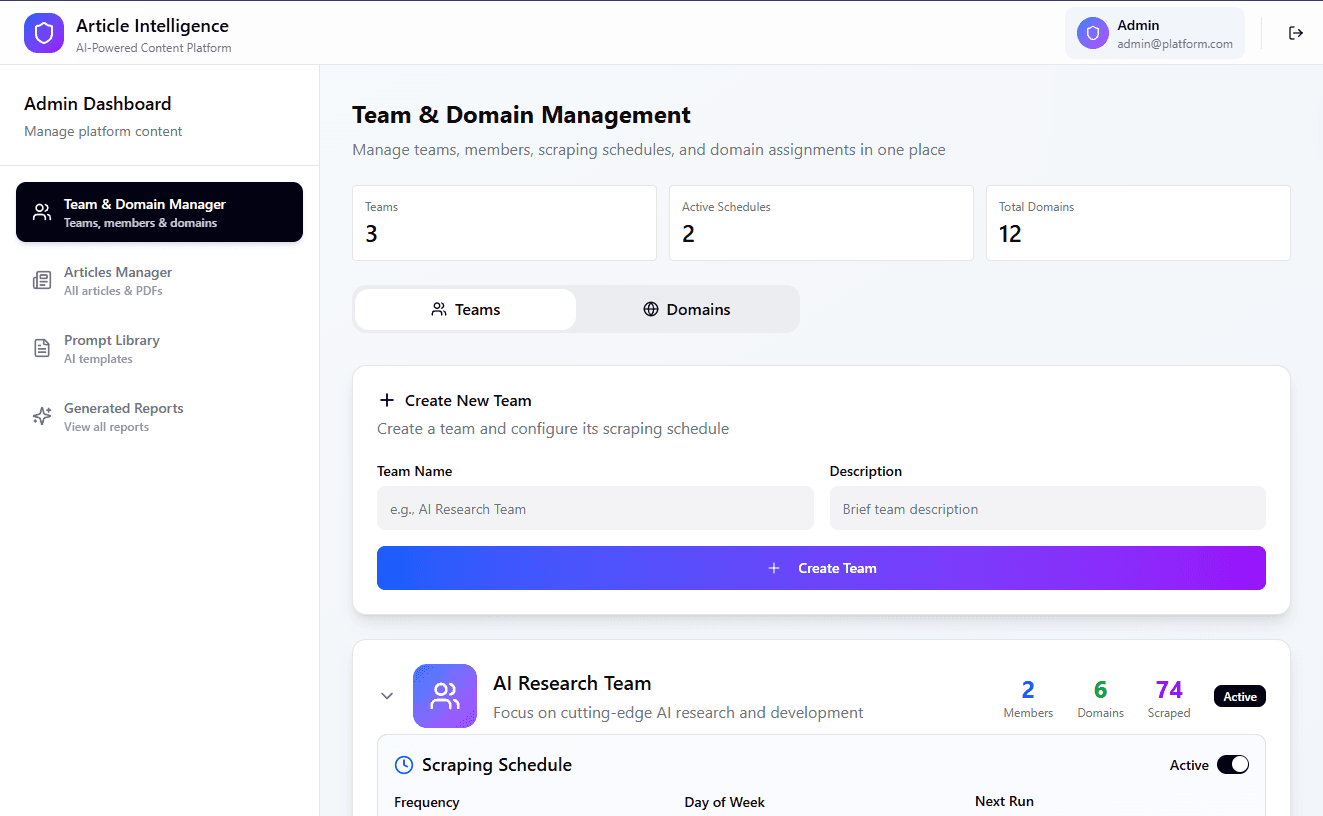
Admin screens support the system-level workflow: managing research teams, assigning domains, reviewing article activity, maintaining prompt templates, and generating reports.

TEAM & DOMAIN

Tracks scraped, reviewed, user-submitted, and PDF-based articles.

Creates research teams, assigns domains, and manages scraping schedules

ARTICLES MANAGER

PROMPT LIBRARY

Stores reusable AI prompts for consistent report generation.

Turns selected articles and prompts into structured outputs.

GENERATED REPORTS

TESTING & CHANGES

What needed refinement.

Tag creation felt understandable — testers still needed clearer field labels and destination guidance.

Dashboard structure worked — users wanted stronger hierarchy between tags, actions, and status.

Editing felt valuable — users expected clearer confirmation that destination changes were live.

Advanced actions felt hidden — previewing, testing, and quick edits needed more prominence.

USER FLOW

Context-based creation

Fixed: Clarified setup steps so users better understood what each field controlled.

DASHBOARD

Clearer inventory actions

Fixed: Surfaced edit, test, and status actions more clearly in the main list view.

STATUS

Better state visibility

Fixed: Strengthened badges and hierarchy for active, draft, and disabled tags.

READ

Safer publishing flow

Fixed: Added stronger feedback so users could verify destination behavior before saving.

ADMIN SCREENS

USER SCREENS

ADMIN SCREENS

Admin screens support the system-level workflow: managing research teams, assigning domains, reviewing article activity, maintaining prompt templates, and generating reports.

TEAM & DOMAIN

Tracks scraped, reviewed, user-submitted, and PDF-based articles.

Creates research teams, assigns domains, and manages scraping schedules

ARTICLES MANAGER

PROMPT LIBRARY

Stores reusable AI prompts for consistent report generation.

Turns selected articles and prompts into structured outputs.

GENERATED REPORTS